Most CI/CD pipelines that deploy to AWS still depend on an access key pasted into a secrets store. It works until the key leaks, expires, or nobody remembers who owns it. OpenID Connect (OIDC) removes the key entirely: the pipeline proves who it is, and AWS hands back credentials that expire in about an hour. This guide shows how to set it up for GitHub Actions and Terraform, and the trust-policy detail that trips most teams up.
Why stored keys are a liability
- They are long-lived, so a leak stays useful to an attacker until someone notices.
- They need rotation, which is manual work that quietly stops happening.
- They are rarely scoped tightly, because one key is easier to share across pipelines.
- They tell you nothing about which pipeline or person used them, which makes audits painful.
How GitHub Actions OIDC works with AWS
GitHub Actions issues a signed token for every workflow run. AWS is configured to trust GitHub as an identity provider, and an IAM role decides which tokens may assume it. No secret is exchanged, so there is nothing to leak or rotate.
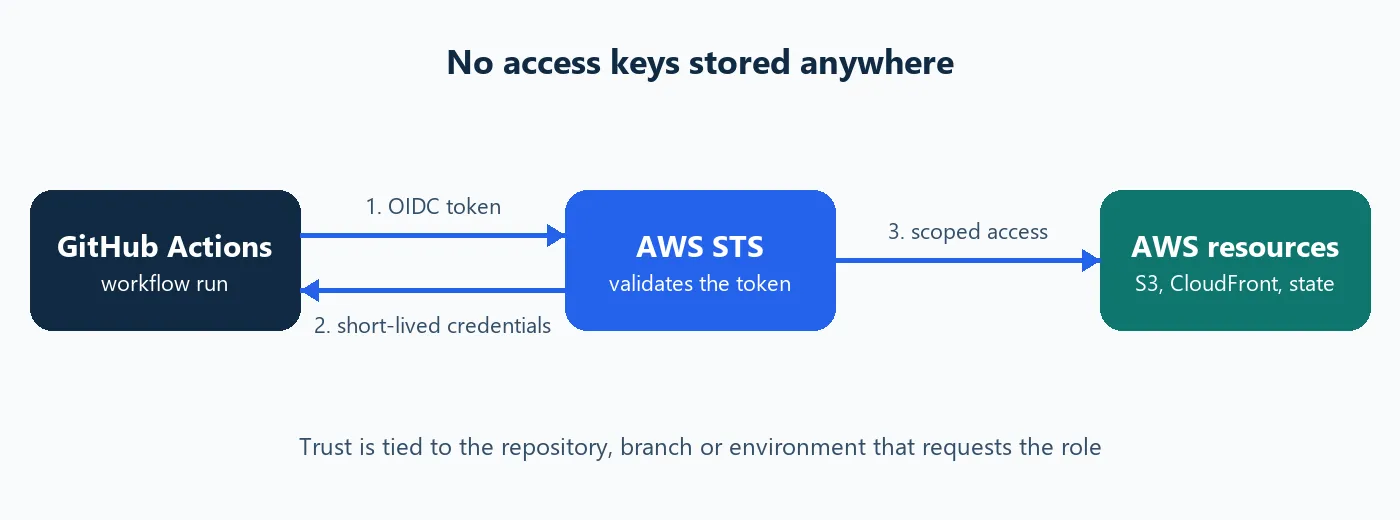
Both platforms document the mechanism in detail: see the GitHub Actions documentation and the AWS IAM user guide.
Set it up step by step
- Create the GitHub OIDC identity provider in IAM once per AWS account (issuer token.actions.githubusercontent.com, audience sts.amazonaws.com).
- Create one IAM role per job, with a trust policy that names the exact repository and branch or environment.
- Attach the narrowest permissions that make the job work, and nothing more.
- In the workflow, grant the id-token: write permission and use the official AWS credentials action with the role ARN.
- Delete the old access keys and the secrets that held them.
Separate roles for plan, apply, and deploy
One broad role is convenient and dangerous. We split responsibilities across three roles:
Role | Who can assume it | What it can do |
Terraform plan | Pull requests in the infrastructure repo | Read-only, plus state lock files |
Terraform apply | A protected GitHub Environment | Create and change the hosting resources |
Site deploy | The website repo's deploy branch | Upload files to one bucket and invalidate the CDN |
The subject-claim detail that trips teams up
The role's trust policy matches the token's sub claim. Newer GitHub repositories can issue an immutable subject that includes numeric owner and repository IDs, for example repo:my-org@123/my-repo@456:ref:refs/heads/main. A policy written for the classic repo:my-org/my-repo:... form silently stops matching, and the pipeline fails with a generic "not authorized to perform sts:AssumeRoleWithWebIdentity" error.
A minimal trust policy for a deploy role looks like this:
{
  "Effect": "Allow",
  "Principal": { "Federated": "arn:aws:iam::<account>:oidc-provider/token.actions.githubusercontent.com" },
  "Action": "sts:AssumeRoleWithWebIdentity",
  "Condition": {
    "StringEquals": { "token.actions.githubusercontent.com:aud": "sts.amazonaws.com" },
    "StringLike":   { "token.actions.githubusercontent.com:sub": "repo:my-org@123/my-repo@456:ref:refs/heads/main" }
  }
}
Common errors and how to fix them
Symptom | Likely cause | Fix |
Not authorized to perform sts:AssumeRoleWithWebIdentity | The sub claim does not match the trust policy | Print the token's sub in a test run and match its exact format, including IDs |
Credentials action fails before calling AWS | Missing id-token: write permission | Add permissions: id-token: write to the workflow or job |
Works on main, fails on pull requests | The role trusts only the branch subject | Use a separate read-only role that trusts the pull_request subject |
Terraform state without extra services
Remote state in S3 now supports native locking (use_lockfile in the S3 backend), so a separate DynamoDB table is no longer needed. Keep the bucket private, versioned, and encrypted, and give the plan role write access only to the lock files.
Frequently asked questions
Do I still need an IAM user?
No. Once the pipeline assumes a role through OIDC, delete the IAM user and its access keys. Keep one break-glass admin login protected with MFA for emergencies.
Can one role serve several repositories?
Yes, by listing several subjects in the trust policy, but one role per job is easier to audit and limits the damage if a repository is compromised.
How long do the credentials last?
A role session defaults to one hour. The credentials cannot be reused after that, which is exactly what makes a leak far less harmful than a stored key.
Does OIDC work with self-hosted runners?
Yes. A self-hosted runner requests the token from GitHub in exactly the same way, so nothing changes on the AWS side. Make sure the runner can reach both the GitHub token endpoint and AWS STS over the network.
What if a workflow token is stolen?
The token is short-lived and only valid for the configured audience, and the trust policy still has to match its repository and branch. That makes a stolen token far harder to abuse than a stored access key, which works from anywhere until someone revokes it.
Roll it out without breaking deployments
Migrate one pipeline at a time. Create the new OIDC role next to the existing key, switch the workflow over, and run it on a non-production branch first. Only when a full deployment succeeds through the role should you remove the old secret from the repository and delete the access key in IAM. Keep the old key for a short, agreed window so a rollback stays possible, then remove it for good.
During the switch, watch CloudTrail for AssumeRoleWithWebIdentity events. They show which repository and branch assumed which role, which is exactly the audit trail stored keys never gave you.
Security review points
- Restrict every trust policy to a specific repository and branch or environment, never a wildcard for the whole organization.
- Require the sts.amazonaws.com audience so tokens minted for other services are rejected.
- Give the plan role read-only access, and keep write permissions on the role that only a protected environment can assume.
- Review role permissions quarterly and remove anything a pipeline no longer uses.
Checklist
- Create the GitHub OIDC identity provider once per AWS account.
- One role per job, each with the narrowest trust policy and permissions that work.
- Match the subject claim format your repositories actually issue.
- Gate the apply role behind a protected environment where your plan allows it.
- Delete every old access key once the pipeline runs on OIDC.
Where we can help
We build and review cloud delivery pipelines like this for engineering teams. See how we work from first assessment to long-term improvement, or get in touch and we will walk through a practical migration plan if your pipelines still rely on stored keys.